
Intro Excel Linear Programming
A starter for smart problem solving in Excel
Introduction
Brief Explanation of Linear Programming:
Linear programming is a mathematical technique used to optimize the allocation of limited resources to achieve a specific goal. It involves maximizing or minimizing a linear objective function while adhering to a set of linear constraints. Linear programming is widely applicable across various fields, helping decision-makers make optimal choices efficiently.
History
Leonid Vitayevich Kantorovich is regarded as the founder of linear programming. In 1975 Kantorovich and Koopmans received the Nobel Memorial Prize given for their contribution to the theory on optimal allocation of resources.
Significance in Problem-Solving:
Linear programming plays a crucial role in solving complex real-world problems where resources are scarce and decisions need to be made strategically. It provides a systematic approach to finding the best possible solution, ensuring efficient resource utilization and cost reduction.
Introduction to Excel-Based Problem:
In this article, we'll delve into a practical problem scenario where linear programming is applied using Microsoft Excel. Imagine you're a manufacturing manager tasked with determining the optimal production schedule to minimize cost while adhering to resource limitations and demand constraints.
Purpose of the Article:

The purpose of this article is to demystify the process of applying linear programming concepts within the familiar environment of Excel. We aim to provide a step-by-step guide, from formulating the problem to interpreting results, catering to both beginners looking to grasp the basics and professionals seeking to enhance their optimization skills.
Target Audience:
This article is designed for individuals ranging from students and entry-level analysts to experienced professionals interested in understanding and implementing linear programming techniques using Excel. Whether you're new to the concept or seeking to refresh your knowledge, this article aims to be an accessible and insightful resource.
Background and Context:
Linear programming is technique where the type of problem target and constrains are limited to linear relationship, meaning that a decision variable can only have a linear relation to the target and constraints.
Excel, a ubiquitous spreadsheet software will help to demonstrate, set up and finally solve a problem using linear programming technique.
Basic Concepts:
Key Concepts of Linear Programming involves an objective function, which we will call
for the moment being. This objective function is dependent in a linear fashion, such as:
Where the variables are multiplied by constants only. Typically, the variables (decision variables) are constraint, think of machine limitations in a production process. These constraints are also linear such as:
First we set up the constant, decision variables and our objective function
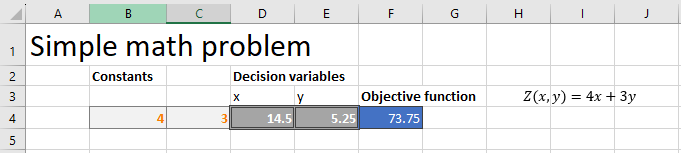
Cells B4,C4 contains the constant, cells D4,E4 will be our variables (decision variables) in this sheet. For now you can see the final result, but we will change it to any random value since these values are to be found. Finally in cell F4, the equation =B4*D4+C4*E4 is contained as our objective function.
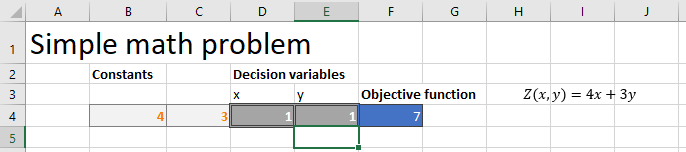
Next we insert the constraints:
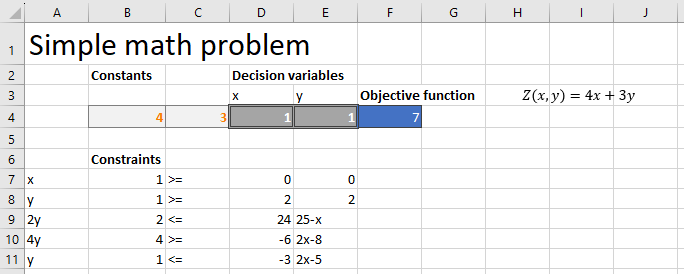
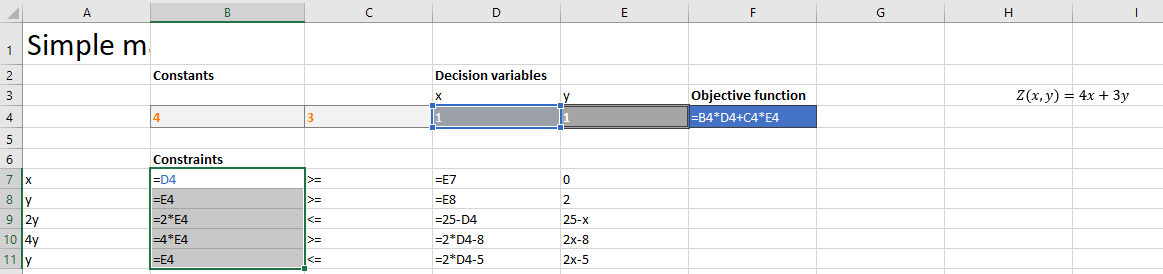
Cells, A7:A11 contain the left hand side of our constrains written as text, while E7:E11 the right hand side written out in text. Cells B7:B11 and D7:D11 contain the actual excel formula to evaluate the equations A7:A11 and E7:E11:
Finally we set up the problem in excel solver:
Step-by-Step Practical Example Guide:

Spacecraft Factory Challenge
Welcome to the Spacecraft Factory, where cutting-edge technology and luxury spacecraft are manufactured for space enthusiasts across the galaxy. In this thrilling simulation, we have a two months (60 days) to showcase our resource management powers and maximize profits.
Our factory is equipped with state-of-the-art facilities, including a superfast futuristic robot, two brilliant spacecraft engineers, and an artistic spacecraft detailer. However, our detailer is embarking on a cosmic holiday, leaving us with just 40 days of their creative touch.
Now, let's dive into the unique demands of our spacecraft models:
StarGlider Time (model Alpha): This sleek and agile spacecraft, codenamed "StarGlider," requires 5 days of precise robot work, 7 days of engineering genius, and 3 days of intricate detailing. The StarGlider promises a profitable voyage of €6,000,000!
CosmoCruiser Time (model Beta) : The luxurious "CosmoCruiser," designed for interstellar comfort, demands 8 days of robot finesse, 10 days of engineering brilliance, and 5 days of lavish detailing. This celestial cruiser brings in a stellar €10,000,000 in profit.
Currently, we're producing two units of each spacecraft per month, raking in a total profit of €64,000,000. Yet, our mission is to elevate our factory's performance to astronomical heights.
The Challenge Awaits!
In this cosmos-spanning challenge, we're tasked with optimizing our resource allocation to maximize profits. Will we boldly produce more StarGliders, focus on crafting superior CosmoCruisers, or strike a balance between the two?
To triumph in this challenge, we must create an Excel-powered optimization model that takes into account the availability of the robot, engineers, and the detailer's cosmic holiday. By aligning our spacecraft production with resource constraints, we'll achieve a financial victory that echoes across the galaxy.
Model setup
Our model to describe our problem is as follows:
Maximize:
Constraints:
The problem is set up as follows in excel:
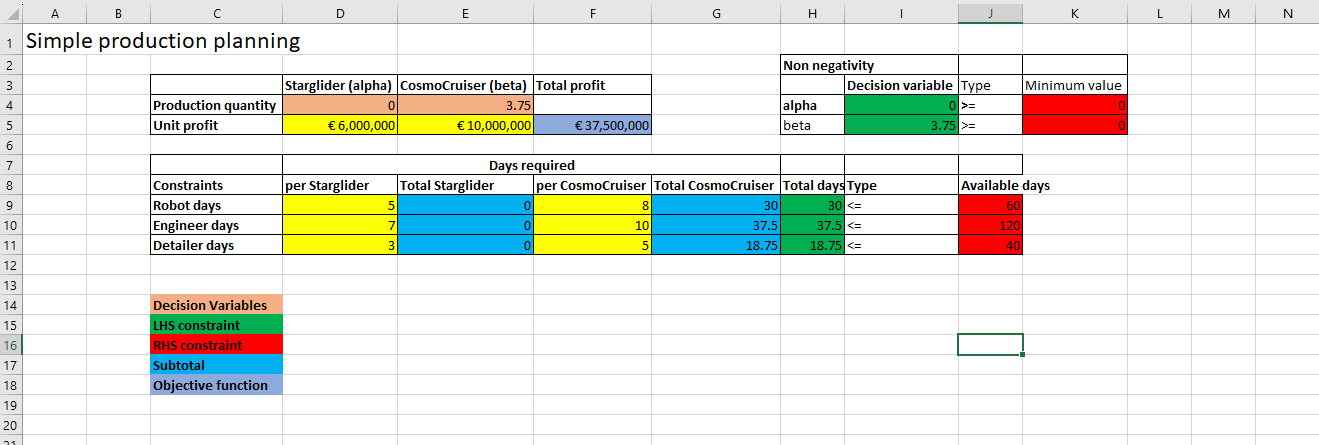
In the first table we enter our objective function in cell F5, which is calculated from the unit profits of each spacecraft: D5 and E5 multiplied by respectively D4 and E4.
In the second table we see the constraints of days required per spacecraft and in H9:H11 the total days per station is calculated, which are restraint to maximum available days (J9:J11).
Now again we set up our problem using excel solver.
The Solver has found an optimal solution! 80,000,000 euros, increasing our factory revenue from 64 to 80m€ sounds great, with the existing resources! Management will be happy to hear our recommendations. 😊
🤗 By the way, did you notice in the video we added an additional constraint to the decision variable? If you watched carefully, you must have seen we added to D4 and E4, the constraint “geh”, meaning integer number in Dutch. This was necessary since we have no intent of delivering an unfinished spacecraft 😉
Fully Fledged Example:

Embark on an exciting journey into the world of industrial powers and strategic scheduling. In this unique challenge, we'll dive into the operations of two distinct offshore production plants spread across diverse locations. Brace yourself as we forge an ingenious production schedule that not only satisfies demand but also minimizes costs.
Our tale unfolds against the backdrop of two dynamic factory states:
Off: A dormant state, resulting in zero production.
On: An active state, with production operating within the factory's specified capacity range.
These factories possess two vital cost components:
Fixed Costs: Incurred as long as a factory is in the active "On" state.
Variable Costs: A dynamic expense per unit of production, fluctuating from month to month.
Two plant locations present themselves as the heart of our operations. Our primary goal? Crafting a production schedule that meets market demand while effectively managing costs.
As we unravel the challenge further, we unearth crucial insights:
Factory Vega (A): A powerhouse with a defined capacity range.
Factory Polaris (B): A parallel operation, equipped with its own capacity range.
The dynamic landscape doesn't end there! In our relentless pursuit of efficiency, we discover that Factory B is set to undergo a maintenance phase in the fifth month, temporarily halting its production powers.
The Epic Task Unfolds!
Our mission is clear: Develop an optimized production schedule that meets market demand with the least financial strain. Will we synchronize the factories' "On" periods, capitalize on their unique capacity strengths, or weave a dynamic strategy that evolves with changing variable costs?
To triumph in this production puzzle, we'll wield the power of Excel to formulate an ingenious scheduling model. As we input fixed and variable costs, embrace capacity constraints, and navigate the maintenance hiatus, our objective remains unwavering: Find the golden balance between demand satisfaction and cost minimization.
The Challenge Awaits Your Command!
Prepare to orchestrate a symphony of efficiency and precision. It's time to engineer a schedule that not only propels production but also crafts a financial symphony resonating with success. Harness your creativity, strategic powers, and Excel's powers to conquer this unique scheduling challenge, transcending the boundaries of traditional problem-solving.
In the realm of production scheduling, every click, formula, and decision you make shapes the destiny of the factories' output. Are you ready to seize the mantle of an industrial virtuoso and orchestrate production perfection?
The data
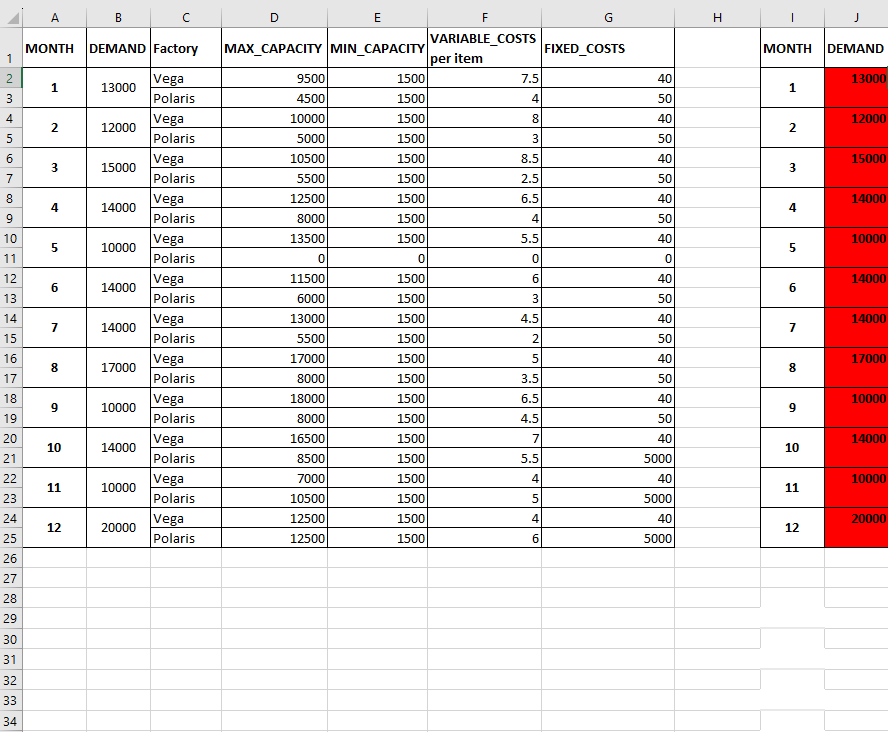
We start by importing our data into excel (you can access the full worksheet with data and examples on my github) First we will make a copy of our table. We will include new columns, with factory states, factory production quantity, and some other columns that will become evident why needed later on.
Mathematical model
After we import out data into excel, we create new columns:
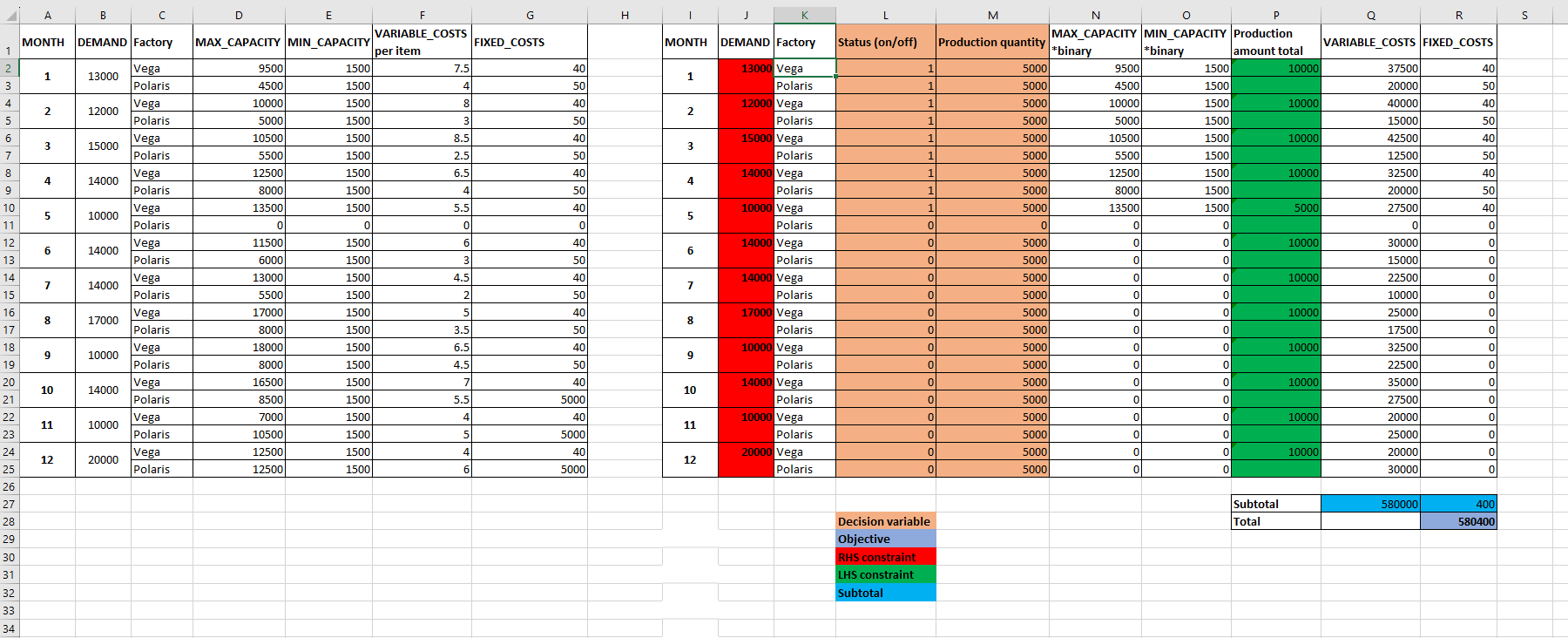
New columns in L and M are the actual decision variables, these will be determined/optimized. Column P contains the total product by both factories Q contains the variable cost per month per factory, R contain fixed cost per month per factory. Finally, N and O contain a helping column to be able to constraint the production quantity based on whether a factory is on or off.
💁♂️ The formula used in columns N and O is respectively =D2*L2 and =E2*L2 for row 2.
This is necessary since in Linear Programming we cannot use IF conditions, instead we model the IF condition mathematically as follows.
When the factory status is 0 both min and max capacity of the factory will equal 0:
Which can only be satisfied when production quantity is equal to 0. Similarly when factory status is 1:
Both of which condition is expressed mathematically by the formulas =D2*L2 and =E2*L2.
Excel setup
Let us finally set up this problem in excel. In this example we will use a slightly different solver, namely https://opensolver.org/’s. It has a very similar interface to excel’s own solver, however with more functionality and no limit on variables. We will not explain how to add this addin, but the website provides a tutorial on how to: https://opensolver.org/installing-opensolver/ Following video will guide on how to configure the solver to solve our production schedule problem. The way we configure the solver is exactly the same as before, however now we will use opensolver’s interface.
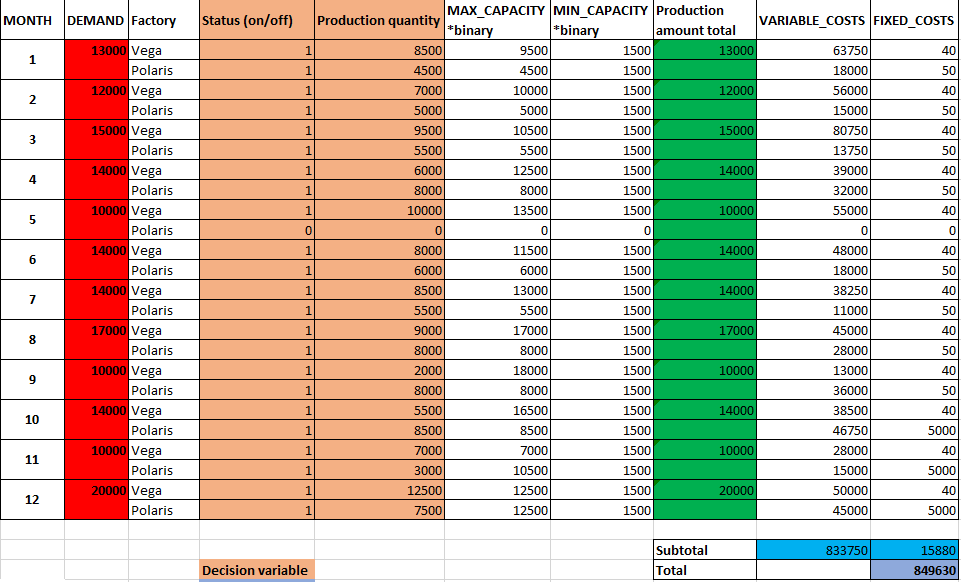
So our production schedule looks as follows:
Tips and Best Practices:
Formulate Mathematically: Begin by accurately translating your problem into mathematical terms. Define your objective function and decision variables, while expressing constraints linearly. This ensures a clear representation of what you aim to achieve.
Check Linearity and Dependencies: Validate that all constraints adhere to linearity rules, avoiding non-linear dependencies. Ensure constraints don't create unnecessary complexity by being linearly dependent. This streamlines problem-solving and optimization efforts.
By adhering to these principles, you establish a solid foundation for effective linear programming, improving your ability to optimize solutions and achieve desired outcomes efficiently.
Finally, first start from a simplified version with much less variables, since this will greatly reduce the calculation/problem assembly time. Many variables will take very long time to assemble, hence starting from a smaller subproblem will allow you to slowly build up your full problem.
Conclusion:
In Conclusion: Embracing linear programming within Excel unlocks a powerful toolset for tackling intricate challenges head-on. By translating real-world problems into mathematical terms and ensuring linearity, you gain the ability to solve complex puzzles with precision.
Key Takeaways: The world of linear programming in Excel is a gateway to informed decision-making and optimal resource management. It's a skill that empowers you to navigate constraints and attain the best possible outcomes across diverse scenarios.
Ready to Dive In? I invite you to dive into the realm of linear programming in Excel. Embrace hands-on experimentation to enhance your problem-solving abilities and witness firsthand how this technique can significantly enhance your efficiency and strategic thinking.
Still have some questions? DM me on Linkedin and lets see how Linear Programming can help you solve your resource allocation problems.
Additional Resources
The examples in this article are inspired by some interesting articles about linear programming in python (pulp).
http://benalexkeen.com/linear-programming-with-python-and-pulp/
https://opensolver.org/